Short answer
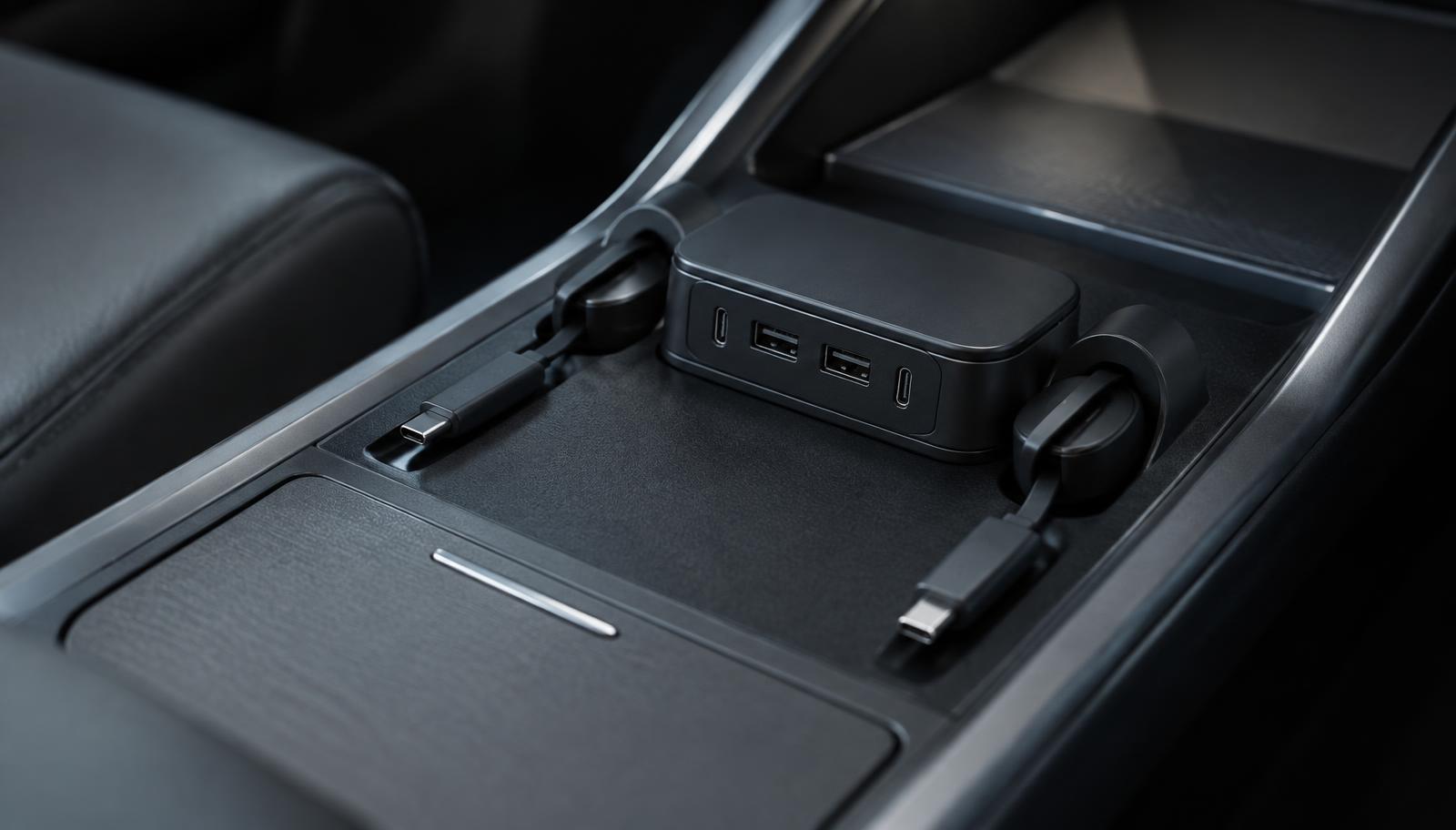
A Tesla console USB hub adds ports and tidy cable routing inside the centre console bin. It is a charging and convenience product, and on current cars the console ports it feeds from are power-only.
That distinction matters. If you need a data port for dashcam or Sentry Mode recording, a charging hub is the wrong product — that job belongs to the car's designated recording port and a suitable drive.
Phone mounts and hubs are complementary rather than alternatives: the mount decides where the phone sits, the hub decides how it gets power without a cable draped across the console.
Fitment snapshot
- Vehicle
- Tesla Model Y Juniper 2025-2026 and Model 3 Highland 2024-2026 for the console hub
- Mounts
- Magnetic phone mounts in this catalogue are recorded for Model 3 and Model Y
- Function
- The console hub in this catalogue is charge-only; it is not a dashcam data port
- Installation
- Drops into the console bin and uses the existing outlet — no permanent modification
What to check before buying
- Decide whether you need more ports, tidier cables, or both — they are different problems.
- If the goal is dashcam storage, stop here and use the car's recording port with a suitable drive instead.
- Check the hub is shaped for your console generation: Juniper and Highland consoles differ from earlier cars.
- Count the devices you actually charge at once; most people need fewer ports than they buy.
- Treat quoted wattage on a listing as a seller statement rather than a measured figure.
- Price and stock live on Amazon. EV Gear Lab does not publish prices or ratings.
Last reviewed by EV Gear Lab on September 23, 2026. Fitment statements come from the compatibility records stored for each product; assessments are EV Gear Lab editorial judgement and are kept separate from manufacturer and marketplace listing claims.
The centre console of a modern Tesla is a deliberately clean object: a covered bin, a sliding tray, an outlet or two and very little else. It is also where every cable in the car ends up, which is why console charging accessories exist at all.
Two categories overlap here. A console USB hub expands the number of ports and, in the better designs, builds the cables into the unit so nothing is loose. A phone mount decides where the device sits while it charges. Owners tend to buy one, live with it for a month, and then buy the other.
This guide covers what a console hub can and cannot do — the charge-only limitation in particular — how Juniper and Highland console shaping affects fitment, and how mounts and hubs work together rather than against each other.
What a console hub is for
Teslas do not have many USB ports, and the ones in the console are shared between charging, phone connection and, on some cars, recording. Two people with phones and a passenger with a tablet exhausts the supply quickly, and the usual result is a console bin full of leads.
A hub addresses that by taking one outlet and presenting several. The better designs go further and integrate retractable cables, so the lead you use most often is always the right length and never needs untangling. The Guaiblue unit in this catalogue works that way: two retractable USB-C leads plus additional USB-A and USB-C ports, dropped into the console bin and connected to the existing outlet.
Nothing here is a modification. The unit sits in the bin, the cover still closes, and removing it returns the car to standard. That reversibility is one of the reasons this category is popular with leased cars.
Related accessories
Charging is not data: the dashcam distinction
This is the single most common misunderstanding in the category. A charging hub supplies power. It does not necessarily carry data, and the Guaiblue unit recorded here does not — its buying notes state that if you need a dashcam or Sentry Mode data port, this product will not do that job.
Dashcam and Sentry Mode recording is a continuous-write task with its own requirements: the car's designated recording port, and a drive specified for sustained writing rather than occasional file transfer. A high-endurance memory card in a suitable adapter is the usual answer, and it is a separate purchase from anything in the charging category.
Buying a hub expecting it to solve recording leads to a returned product. Buying a hub knowing it charges only, and handling recording separately, leads to a console that works.
Related accessories
Related guides
Fitment: Juniper and Highland consoles
Console accessories are shaped products. A hub that drops neatly into a Model Y Juniper bin is relying on that bin's dimensions, and the 2024 Model 3 Highland shares enough of that interior architecture that sellers commonly list the two together.
The Guaiblue hub is recorded for Model Y Juniper 2025-2026 and Model 3 Highland 2024-2026. That is the seller's stated coverage, and it is deliberately narrower than a generic Model 3 and Model Y claim would be. Owners of earlier cars should read the absence of their model year as an absence of a claim.
Installation is described by the seller as angling the unit into the bin, connecting it to the existing console outlet, closing the sliding cover and routing the retractable leads through the cable slots. If any of those steps requires force on your car, the unit is not the right shape for it.
Mounts: where the phone actually sits
A charging hub with no mount produces a phone lying face-up in the console, which is fine until you need navigation. Magnetic mounts solve placement, and the three in this catalogue take different approaches to where they anchor.
Screen-edge and dash-mounted magnetic holders keep the phone high and close to the driver's normal sightline. Foldable hidden mounts prioritise a clean interior when the phone is not in use, which suits owners who dislike anything protruding from a minimal dashboard.
Whichever style you choose, the cable question returns immediately: a mount that holds the phone beautifully still needs power to reach it, which is the argument for pairing a mount with a hub that has a retractable lead rather than a loose one.
Console charging and mounting products
Related accessories
Related Tesla models
Common mistakes
- Buying a charging hub to solve dashcam storage.
- Assuming a Juniper or Highland console product fits an earlier Model 3 or Model Y.
- Treating a quoted total wattage as the power every port delivers simultaneously.
- Adding ports without adding cable management, so the console is no tidier than before.
- Choosing a mount without checking whether the charging cable can reach it neatly.
- Forgetting that a built-in retractable cable cannot be replaced on its own.
Conclusion
Console charging is a small category with one important boundary in it. A hub adds ports and tidies cables; it does not turn the console into a recording port, and the product recorded here says so plainly.
Decide whether your problem is ports, cable chaos or phone placement, confirm the hub is shaped for a Juniper or Highland console before ordering, and handle dashcam storage as the separate purchase it is. Done in that order, the console ends up genuinely clean rather than merely fuller.
Frequently asked questions
What does a Tesla console USB hub actually do?
It sits in the centre console bin, takes power from the car's existing console outlet, and presents several USB ports — sometimes with built-in retractable cables — so passengers can charge without threading loose leads through the console. It is an expansion and tidiness product rather than a functional upgrade to the car.
Can I record dashcam footage through a USB hub?
Not through a charge-only hub. The Guaiblue hub recorded in this catalogue charges only, which its buying notes state directly. Dashcam and Sentry Mode recording needs the car's designated recording port and a drive suited to continuous writing.
Does a Juniper console hub fit an older Model Y?
Do not assume so. The hub in this catalogue is recorded for the Model Y Juniper 2025-2026 and Model 3 Highland 2024-2026 consoles, because it is shaped to drop into those bins. Earlier consoles are a different shape.
Are retractable cables better than loose ones?
They solve the specific problem of cables migrating around the console and getting shut in the lid. The trade-off is that a built-in cable cannot be replaced independently, so the retraction mechanism becomes a wear point for the whole unit.
Do I still need a phone mount if I have a hub?
They do different jobs. A hub gives the phone power; a mount decides where the phone sits and whether the driver can see it without looking away from the road. Most owners who use navigation on the phone end up with both.
How much power do these hubs deliver?
Sellers quote total output figures, and we record them as quoted rather than as verified. Real delivered power depends on the car's outlet, the number of devices connected and each device's own negotiation, so treat a headline wattage as an upper bound stated by the seller.
How EV Gear Lab works: we research Tesla and EV accessories, record the fitment each product states, and publish our own assessment of how useful it is. Fitment and specification statements come from the product's stored record and the manufacturer listing; the buying judgement is EV Gear Lab editorial opinion. We do not sell these products — purchase links go to Amazon.
More guides
- Best Tesla Accessories for Model 3 & Model Y
- Tesla Model Y Juniper Accessories Worth Buying First
- Tesla Model Y Accessories: The Complete Buyer's Guide
- Best Floor Mats for Tesla Model Y: How to Choose
- Tesla Model 3 Accessories Worth Buying First
- Tesla Charging at Home: Cables, Holders and Setup
- Tesla Dashcam and Sentry Mode Storage Explained
- Tesla Winter Driving: Protection and Cabin Gear
- Tesla Interior Organization: Console, Frunk and Trunk
- How to Check Tesla Accessory Fitment by Model and Year
- Tesla Road Trip Accessories: What to Pack and What to Skip
- Tesla Pet Travel Accessories: A Practical Guide for Dogs and Cats
- Tesla Model Y Adapter Guide: J1772, NACS & Charging Adapters
- 2026 Tesla Model 3 16-Inch Screen: Fitment Guide
- Tesla Model Y Cabin Air Filter: HEPA Replacement Guide
- Tesla Jack Pads and Lifting Pucks: Fitment and Safe Use
- Tesla Model Y Sunshade Guide: Windscreen and Glass Roof
- Tesla Model Y Mattress Guide: Camping and Sleeping Setup
- Tesla Model Y Fridge and Cooler Guide: Frunk, Console and Trunk
- Tesla Model S and Model X Accessories: Protection and Shading
- Tesla Cybertruck Bed Mat Guide: Protecting the Vault
- Tesla Model 3 Highland Floor Mats and Interior Protection